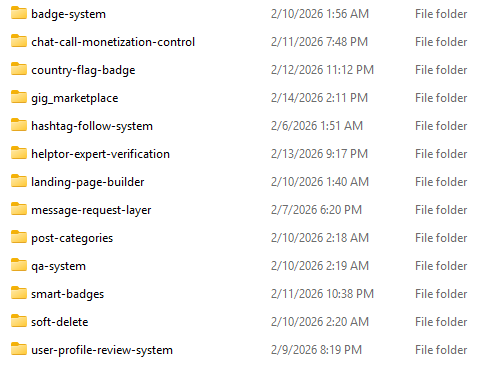



#plugin

1 posts0 followers
Trending Today
No data
Trending This Week
No data
  • Buy Now:https://portasale.com/items/ultimate-advanced-story-plugin-instagram-style-stories-highlights-music-editor-reactions/1086
    Buy Now: https://portasale.com/items/ultimate-advanced-story-plugin-instagram-style-stories-highlights-music-editor-reactions/1086
    0 Commentaires 0 Parts 8 Vue
  • Visit now: https://portasale.com/items/gig-marketplace-plugin-freelancer-service-job-marketplace-sngine-add-on/1085
    Build your own Fiverr-style gig marketplace directly on your website with this powerful Gig Marketplace Plugin. This plugin transforms your platform into a complete service-selling ecosystem where users can create gigs, offer services, and earn money online.
    Designed for flexibility and scalability, this plugin allows admins to manage gigs, users, orders, and payments efficiently while providing a smooth experience for both buyers and sellers.
    Key Features
    Create & Manage Gigs (Title, Price, Description, Delivery Time)
    User Dashboard for Sellers & Buyers
    Order Management System
    Gig Categories & Filters
    Messaging System between Buyer & Seller
    Ratings & Reviews System
    Admin Panel for Full Control
    Commission & Earnings Management
    Secure Payment Workflow
    Mobile Responsive Design
    This type of plugin enables building a freelancer marketplace system with bidding, messaging, and service selling features, similar to popular marketplace platforms.
    Why Choose This Plugin?
    Turn your website into a complete earning platform
    Perfect for freelancers, agencies, and startups
    Easy to install and integrate
    Clean UI & optimized performance
    Scalable for SaaS or multi-vendor marketplace
    Use Cases
    Freelance Marketplace (like Fiverr / Upwork)
    Digital Services Platform
    Local Services Marketplace
    Micro Job & Gig Selling Website
    Agency Service Portal
    What You Get
    Full Plugin Source Code
    Installation Guide
    Documentation
    Free Basic Support
    Visit now: https://portasale.com/items/gig-marketplace-plugin-freelancer-service-job-marketplace-sngine-add-on/1085 Build your own Fiverr-style gig marketplace directly on your website with this powerful Gig Marketplace Plugin. This plugin transforms your platform into a complete service-selling ecosystem where users can create gigs, offer services, and earn money online. Designed for flexibility and scalability, this plugin allows admins to manage gigs, users, orders, and payments efficiently while providing a smooth experience for both buyers and sellers. Key Features Create & Manage Gigs (Title, Price, Description, Delivery Time) User Dashboard for Sellers & Buyers Order Management System Gig Categories & Filters Messaging System between Buyer & Seller Ratings & Reviews System Admin Panel for Full Control Commission & Earnings Management Secure Payment Workflow Mobile Responsive Design This type of plugin enables building a freelancer marketplace system with bidding, messaging, and service selling features, similar to popular marketplace platforms. Why Choose This Plugin? Turn your website into a complete earning platform Perfect for freelancers, agencies, and startups Easy to install and integrate Clean UI & optimized performance Scalable for SaaS or multi-vendor marketplace Use Cases Freelance Marketplace (like Fiverr / Upwork) Digital Services Platform Local Services Marketplace Micro Job & Gig Selling Website Agency Service Portal What You Get Full Plugin Source Code Installation Guide Documentation Free Basic Support
    0 Commentaires 0 Parts 12 Vue
  • How to Install Sngine Plugin System | Step-by-Step Tutorial
    If you want to extend Sngine features without editing core files, the plugin system is the best and safest way.
    #sngine#development#update#tutorial
    How to Install Sngine Plugin System | Step-by-Step Tutorial If you want to extend Sngine features without editing core files, the plugin system is the best and safest way. #sngine #development #update #tutorial
    Like
    1
    5 Commentaires 0 Parts 224 Vue
  • I am glad to inform you that, some plugins are ready to launch.
    Stay tuned.
    #update#sngine#plugin
    I am glad to inform you that, some plugins are ready to launch. Stay tuned. #update #sngine #plugin
    Like
    3
    0 Commentaires 0 Parts 189 Vue
  • Dear Member, I am creating #installation video for all sngine plugin #system. It will help you to install without any doubts.
    Please allow some time.
    Dear Member, I am creating #installation video for all sngine plugin #system. It will help you to install without any doubts. Please allow some time.
    Like
    Love
    2
    2 Commentaires 0 Parts 185 Vue
  • Plugin System For Sngine Digital Créer
    Gratuit
    En stock
    New Delhi
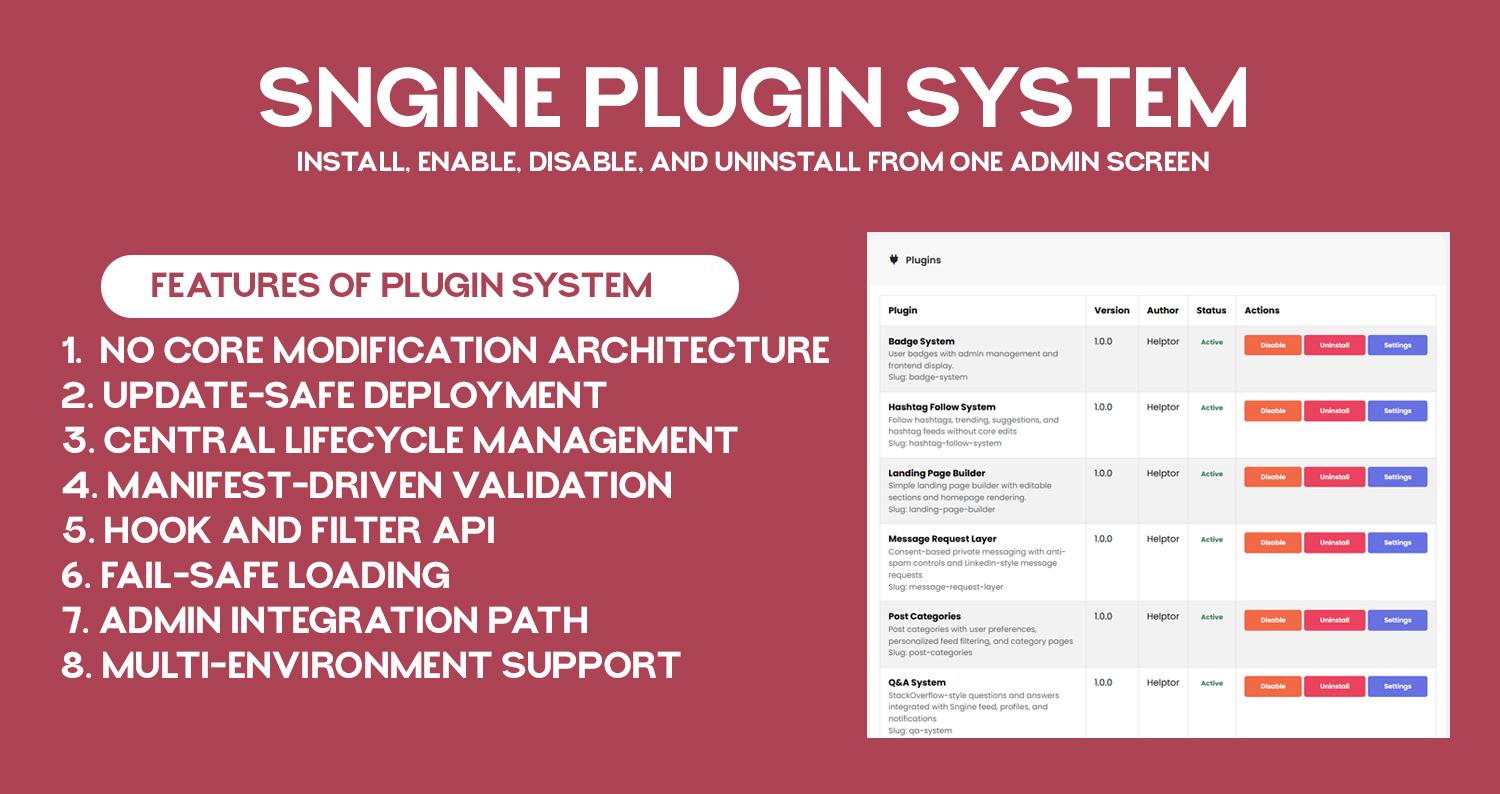
    No core modification architecture: plugin layer loads before Sngine and keeps custom logic outside core files.
    Update-safe deployment: core upgrades do not remove plugin folders or plugin registry state.
    Central lifecycle management: install, enable, disable, and uninstall from one admin screen.
    Manifest-driven validation: each plugin is discovered and verified through plugin.json metadata.
    Hook and filter API: plugins can subscribe to request, AJAX, and output-buffer events without template edits.
    Fail-safe loading: plugin runtime is designed to avoid full-site crash from one plugin failure.
    Admin integration path: plugin settings pages are accessible directly from /admincp/plugins.
    Multi-environment support: works on shared hosting and VPS with correct auto_prepend_file setup.
    Documentation: https://helptor.in/doc
    No core modification architecture: plugin layer loads before Sngine and keeps custom logic outside core files. Update-safe deployment: core upgrades do not remove plugin folders or plugin registry state. Central lifecycle management: install, enable, disable, and uninstall from one admin screen. Manifest-driven validation: each plugin is discovered and verified through plugin.json metadata. Hook and filter API: plugins can subscribe to request, AJAX, and output-buffer events without template edits. Fail-safe loading: plugin runtime is designed to avoid full-site crash from one plugin failure. Admin integration path: plugin settings pages are accessible directly from /admincp/plugins. Multi-environment support: works on shared hosting and VPS with correct auto_prepend_file setup. Documentation: https://helptor.in/doc
    Love
    1
    36 Commentaires 0 Parts 355 Vue
  • We are currently developing a Global Plugin System for #Sngine, designed to manage all plugins from a single, centralized location with easy installation and uninstallation.
    As part of this initiative, the following plugins are our top priorities:
    1. Reputation / Points System
    2. Hashtag Follow System
    3. Paid Chat & Call (per-minute based)
    4. HTML support in posts
    5. One-click database and file upload backup
    6. SEO optimization for posts
    Note: If the #Zamblek team releases any of these features natively, we will exclude that item from our #development#roadmap.
    Additionally, if you have any suggestions or feature requests, we would be happy to hear them.
    We are currently developing a Global Plugin System for #Sngine, designed to manage all plugins from a single, centralized location with easy installation and uninstallation. As part of this initiative, the following plugins are our top priorities: 1. Reputation / Points System 2. Hashtag Follow System 3. Paid Chat & Call (per-minute based) 4. HTML support in posts 5. One-click database and file upload backup 6. SEO optimization for posts Note: If the #Zamblek team releases any of these features natively, we will exclude that item from our #development #roadmap. Additionally, if you have any suggestions or feature requests, we would be happy to hear them.
    Like
    Wow
    3
    3 Commentaires 0 Parts 314 Vue
  • Mandatory Post Categories System Plugin for Sngine Digital Créer
    ₹1,900.00
    En stock
    New Delhi, Delhi, India
    Mandatory Post Categories System for Sngine is a powerful plugin that brings blog-style category organization to your Sngine-based website.
    With this plugin, users must select a category before publishing a post, ensuring that all content is properly structured from the start. Categories are fully controlled by the admin, giving you complete authority over how posts are organized, moderated, and displayed.
    This plugin is ideal for communities, help platforms, forums, Q&A websites, and discussion networks that need clean content structure and better discoverability.
    Why You Need This Plugin
    Default Sngine posts are unstructured, which can lead to:
    Mixed and confusing content
    Difficult moderation
    Poor content discovery
    Low-quality discussions
    This plugin solves these problems by enforcing mandatory categorization, just like a professional blog or forum system.
    🔑 Key Features
    ✔ Mandatory Category Selection
    Users cannot publish a post without selecting a category.
    This ensures that every post belongs to a clear topic area.
    If a category is not selected, the system displays a validation message and prevents posting.
    ✔ Admin-Controlled Categories
    Only admins can manage post categories.
    From the admin panel, you can:
    Create new categories
    Edit category names
    Enable or disable categories
    Delete categories when no longer needed
    Users cannot create, edit, or delete categories, keeping your platform structured and controlled.
    ✔ Unlimited Categories
    There is no limit to the number of categories you can create.
    You can organize posts based on your niche, such as:
    Career
    Business
    Education
    Health
    Technology
    Personal
    ✔ One Category Per Post (Clean Structure)
    Each post can belong to only one category, ensuring:
    Focused discussions
    Clean feeds
    Easy moderation
    ✔ User Restriction After Posting
    Once a post is published:
    ❌ Users cannot change the post category
    This prevents misuse and keeps content consistent.
    ✔ Admin Override for Existing Posts
    Admins have full moderation control and can:
    Change the category of any existing post
    This is useful when:
    Users select the wrong category
    Content needs re-organization
    Moderation adjustments are required
    ✔ Category-Wise Post Pages
    Each category has its own dedicated page where all related posts are displayed together.
    Example:
    /category/career
    /category/business
    This helps users quickly find content related to a specific topic.
    ✔ Category Label on Posts
    Every post clearly displays its category label, making it easy to understand the post topic at a glance.
    🎯 Perfect For
    Community websites
    Q&A platforms
    Help & support networks
    Educational forums
    Business discussion platforms
    Niche social networks built on Sngine
    Mandatory Post Categories System for Sngine is a powerful plugin that brings blog-style category organization to your Sngine-based website. With this plugin, users must select a category before publishing a post, ensuring that all content is properly structured from the start. Categories are fully controlled by the admin, giving you complete authority over how posts are organized, moderated, and displayed. This plugin is ideal for communities, help platforms, forums, Q&A websites, and discussion networks that need clean content structure and better discoverability. Why You Need This Plugin Default Sngine posts are unstructured, which can lead to: Mixed and confusing content Difficult moderation Poor content discovery Low-quality discussions This plugin solves these problems by enforcing mandatory categorization, just like a professional blog or forum system. 🔑 Key Features ✔ Mandatory Category Selection Users cannot publish a post without selecting a category. This ensures that every post belongs to a clear topic area. If a category is not selected, the system displays a validation message and prevents posting. ✔ Admin-Controlled Categories Only admins can manage post categories. From the admin panel, you can: Create new categories Edit category names Enable or disable categories Delete categories when no longer needed Users cannot create, edit, or delete categories, keeping your platform structured and controlled. ✔ Unlimited Categories There is no limit to the number of categories you can create. You can organize posts based on your niche, such as: Career Business Education Health Technology Personal ✔ One Category Per Post (Clean Structure) Each post can belong to only one category, ensuring: Focused discussions Clean feeds Easy moderation ✔ User Restriction After Posting Once a post is published: ❌ Users cannot change the post category This prevents misuse and keeps content consistent. ✔ Admin Override for Existing Posts Admins have full moderation control and can: Change the category of any existing post This is useful when: Users select the wrong category Content needs re-organization Moderation adjustments are required ✔ Category-Wise Post Pages Each category has its own dedicated page where all related posts are displayed together. Example: /category/career /category/business This helps users quickly find content related to a specific topic. ✔ Category Label on Posts Every post clearly displays its category label, making it easy to understand the post topic at a glance. 🎯 Perfect For Community websites Q&A platforms Help & support networks Educational forums Business discussion platforms Niche social networks built on Sngine
    Like
    2
    7 Commentaires 0 Parts 410 Vue
  • In this video, I show you how to install the Custom Badge Plugin on a Sngine website step by step.
    The installation process is very simple and does not require any coding knowledge.
    ✅ Installation Steps Covered:
    Download the Custom Badge Plugin
    Upload the plugin folder to your Sngine directory
    Import the provided SQL file into your database using phpMyAdmin
    Activate the plugin from the admin panel
    That’s it! Your Custom Badge Plugin will be ready to use.
    🔄 Update Policy
    Plugin updates will not overwrite your existing files
    If any update requires file replacement, it will be released as a new version
    🤝 Support Promise
    When you pay for my work, it is my responsibility to ensure the plugin works correctly for you.
    If you face any issues, feel free to reach out — I’m always happy to help.
    👍 Don’t forget to like, share, and subscribe for more Sngine tutorials and plugins.
    #Sngine
    #SnginePlugin
    #CustomBadge
    #SngineTutorial
    #PluginInstallation
    #PHP
    #WebDevelopment
    #SngineAddons
    #SngineCommunity
    #Helptor
    In this video, I show you how to install the Custom Badge Plugin on a Sngine website step by step. The installation process is very simple and does not require any coding knowledge. ✅ Installation Steps Covered: Download the Custom Badge Plugin Upload the plugin folder to your Sngine directory Import the provided SQL file into your database using phpMyAdmin Activate the plugin from the admin panel That’s it! Your Custom Badge Plugin will be ready to use. 🔄 Update Policy Plugin updates will not overwrite your existing files If any update requires file replacement, it will be released as a new version 🤝 Support Promise When you pay for my work, it is my responsibility to ensure the plugin works correctly for you. If you face any issues, feel free to reach out — I’m always happy to help. 👍 Don’t forget to like, share, and subscribe for more Sngine tutorials and plugins. #Sngine #SnginePlugin #CustomBadge #SngineTutorial #PluginInstallation #PHP #WebDevelopment #SngineAddons #SngineCommunity #Helptor
    Love
    3
    6 Commentaires 0 Parts 429 Vue
  • Advanced User Badge System – Sngine Plugin (Admin-Controlled) Digital Créer
    ₹1,900.00
    En stock
    New Delhi, Delhi, India
    Advanced User Badge System is a secure and flexible badge management plugin for Sngine – The Ultimate PHP Social Network Platform.
    It allows admins to create, manage, and assign custom badges to users, helping you build trust, credibility, and engagement across your community.
    Badges are displayed next to usernames on profiles, posts, and comments, making user roles, verification status, and achievements instantly visible.
    How It Helps
    ✔ Builds Trust & Transparency: Easily identify verified users, moderators, experts, and trusted members — reducing fake profiles and impersonation.
    ✔ Boosts User Engagement: Badges motivate users to stay active, contribute more, and feel recognized within the community.
    ✔ Improves Community Quality: Clear visual indicators help users understand who they’re interacting with, leading to better conversations.
    ✔ Fully Admin-Controlled: Only admins can create and assign badges — ensuring a secure and abuse-free system.
    Key Benefits
    Professional & trustworthy user identity system
    Reduces spam and fake verification
    Encourages long-term user participation
    Admin-only control for maximum security
    Lightweight, fast, and mobile-friendly
    Seamless integration with Sngine UI
    Features
    Badge Management
    Full badge CRUD (Create, Read, Update, Delete)
    Activate / deactivate badges anytime
    Assign multiple badges per user
    Admin-only badge assignment
    Customization
    Custom badge name & description
    Font Awesome icon support
    Badge color customization
    Tooltip descriptions on hover / tap
    Badge Display
    Badges appear next to usernames on:
    User profile pages
    Posts
    Comments
    Only active badges are displayed publicly.
    User Experience
    Clean & modern design
    Mobile-friendly and responsive
    Lightweight tooltips
    Smooth UI integration
    Developer Friendly
    Follows existing Sngine code style & conventions
    Easy installation
    No core file modification
    Ready to use after SQL setup & JS handlers
    Advanced User Badge System is a secure and flexible badge management plugin for Sngine – The Ultimate PHP Social Network Platform. It allows admins to create, manage, and assign custom badges to users, helping you build trust, credibility, and engagement across your community. Badges are displayed next to usernames on profiles, posts, and comments, making user roles, verification status, and achievements instantly visible. How It Helps ✔ Builds Trust & Transparency: Easily identify verified users, moderators, experts, and trusted members — reducing fake profiles and impersonation. ✔ Boosts User Engagement: Badges motivate users to stay active, contribute more, and feel recognized within the community. ✔ Improves Community Quality: Clear visual indicators help users understand who they’re interacting with, leading to better conversations. ✔ Fully Admin-Controlled: Only admins can create and assign badges — ensuring a secure and abuse-free system. Key Benefits Professional & trustworthy user identity system Reduces spam and fake verification Encourages long-term user participation Admin-only control for maximum security Lightweight, fast, and mobile-friendly Seamless integration with Sngine UI Features Badge Management Full badge CRUD (Create, Read, Update, Delete) Activate / deactivate badges anytime Assign multiple badges per user Admin-only badge assignment Customization Custom badge name & description Font Awesome icon support Badge color customization Tooltip descriptions on hover / tap Badge Display Badges appear next to usernames on: User profile pages Posts Comments Only active badges are displayed publicly. User Experience Clean & modern design Mobile-friendly and responsive Lightweight tooltips Smooth UI integration Developer Friendly Follows existing Sngine code style & conventions Easy installation No core file modification Ready to use after SQL setup & JS handlers
    5 Commentaires 0 Parts 585 Vue
Helptor Expert Guidance https://helptor.in