#update

5 posts1 followers
Trending Today
No data
Trending This Week
No data
  • Tomorrow I will publish multi-language system for Landing page builder plugin.

    #update #sngine

    Tomorrow I will publish multi-language system for Landing page builder plugin.#update #sngine
    Like
    2
    0 Comentários 0 Compartilhamentos 430 Visualizações
  • Launching Soon

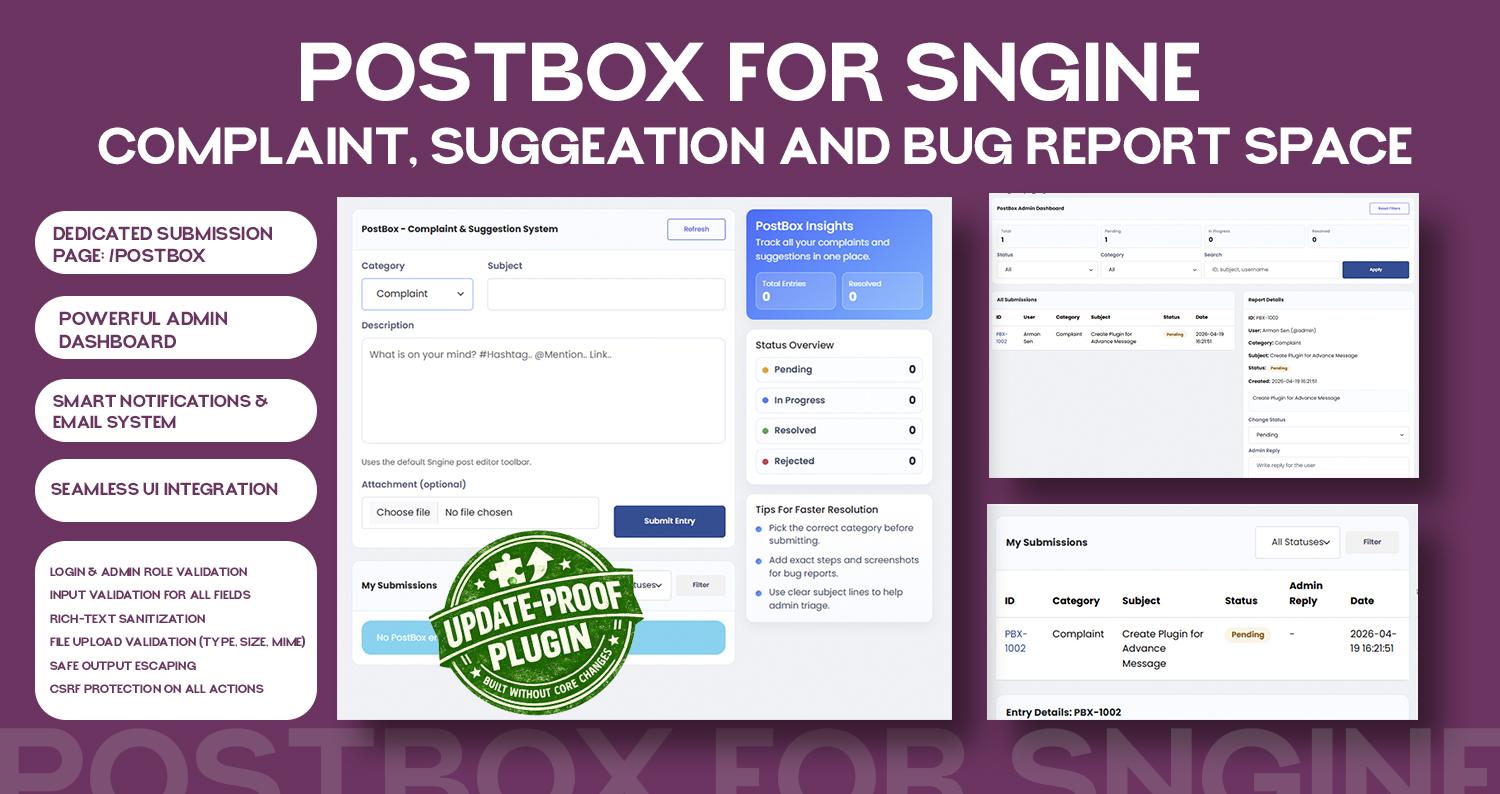
    PostBox: Space for manage all request for suggeation, complaints, bug report


    #update #Sngine

    Launching SoonPostBox: Space for manage all request for suggeation, complaints, bug report #update #Sngine
    Wow
    1
    0 Comentários 0 Compartilhamentos 540 Visualizações
  • Launching Soon:

    Landing Page Builder

    #update #Sngine

    Launching Soon:Landing Page Builder#update #Sngine
    Like
    Love
    2
    10 Comentários 0 Compartilhamentos 531 Visualizações
  • Working on to upgrade message features. I will release upgrade soon.

    If you have any suggeation, share me on Postbox: https://helptor.in/postbox

    #sngine #update
    Working on to upgrade message features. I will release upgrade soon. If you have any suggeation, share me on Postbox: https://helptor.in/postbox #sngine #update
    Like
    Love
    2
    3 Comentários 0 Compartilhamentos 730 Visualizações
  • I would like to inform you that all plugin updates compatible with Sngine 4.3 will be published within the next few days.Please find below some of the key updates:

    1. Updated Plugin Manager URL:The plugin manager link has been changed from /admincp/plugins to /admincp/heptor.
    2. Auto Update :An auto-update feature will be available, making it easier and more convenient for you to update plugins.
    I would like to inform you that all plugin updates compatible with Sngine 4.3 will be published within the next few days.Please find below some of the key updates:Updated Plugin Manager URL:The plugin manager link has been changed from /admincp/plugins to /admincp/heptor.Auto Update :An auto-update feature will be available, making it easier and more convenient for you to update plugins.
    Love
    Like
    4
    0 Comentários 0 Compartilhamentos 651 Visualizações
  • How to Install Sngine Plugin System | Step-by-Step Tutorial

    If you want to extend Sngine features without editing core files, the plugin system is the best and safest way.

    #sngine #development #update #tutorial
    How to Install Sngine Plugin System | Step-by-Step Tutorial If you want to extend Sngine features without editing core files, the plugin system is the best and safest way. #sngine #development #update #tutorial
    Like
    1
    5 Comentários 0 Compartilhamentos 1KB Visualizações
  • I am glad to inform you that, some plugins are ready to launch.
    Stay tuned.

    #update #sngine #plugin
    I am glad to inform you that, some plugins are ready to launch. Stay tuned. #update #sngine #plugin
    Like
    Wow
    4
    0 Comentários 0 Compartilhamentos 879 Visualizações
  • Dear member, If you are registering as an Expert on Helptor, please ensure that you verify your expert account within 15 days of registration.

    If verification is not completed within this period, your profile will automatically be converted to a regular user account.

    #update #notice #policy #helptor
    Dear member, If you are registering as an Expert on Helptor, please ensure that you verify your expert account within 15 days of registration. If verification is not completed within this period, your profile will automatically be converted to a regular user account. #update #notice #policy #helptor
    Love
    1
    0 Comentários 0 Compartilhamentos 942 Visualizações
  • Plugin System For Sngine 2.0 Digital Novo
    Gratuito
    Em estoque
    New Delhi
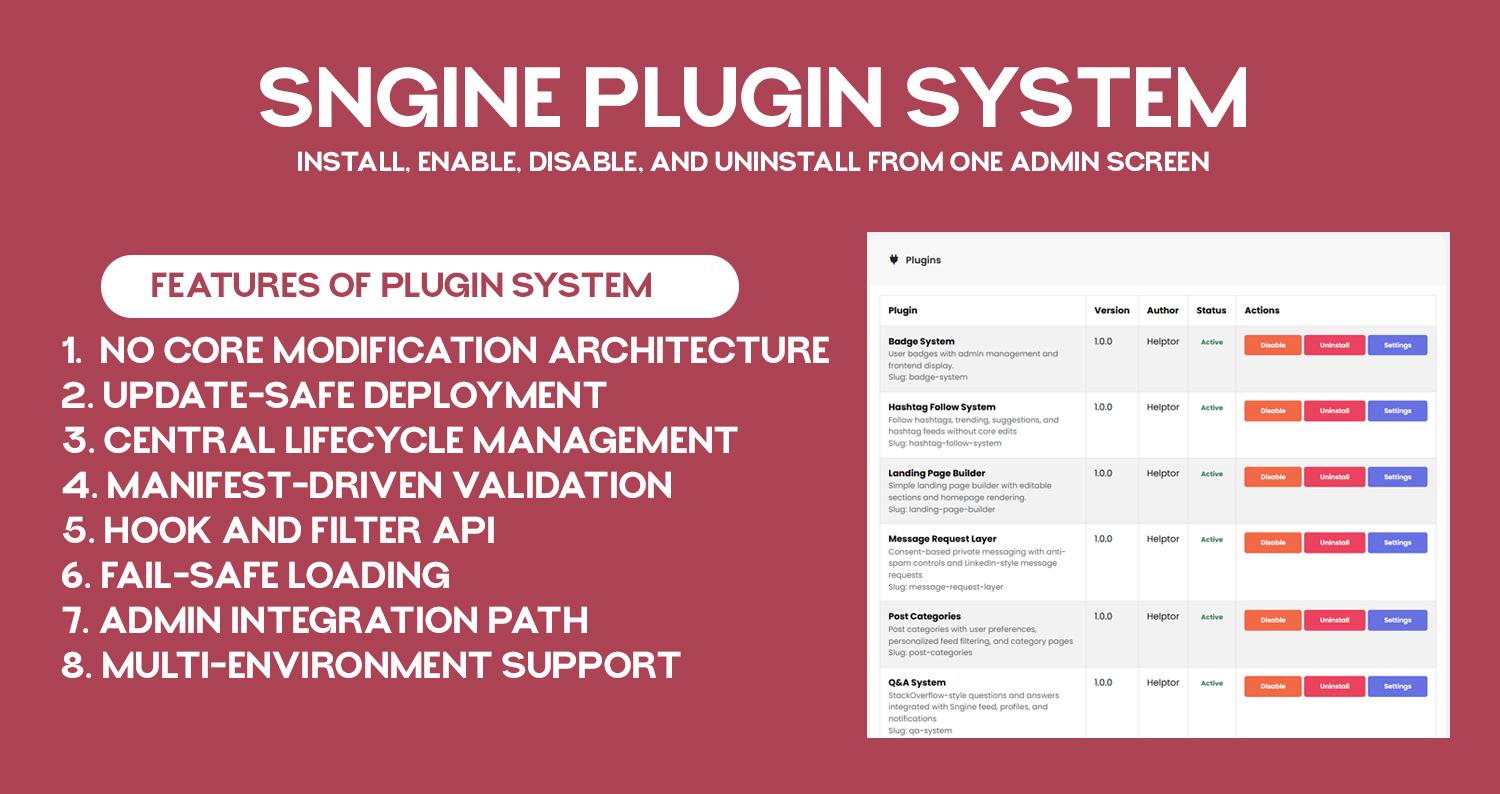
    No core modification architecture: plugin layer loads before Sngine and keeps custom logic outside core files.

    Update-safe deployment: core upgrades do not remove plugin folders or plugin registry state.

    Central lifecycle management: install, enable, disable, and uninstall from one admin screen.

    Manifest-driven validation: each plugin is discovered and verified through plugin.json metadata.

    Hook and filter API: plugins can subscribe to request, AJAX, and output-buffer events without template edits.

    Fail-safe loading: plugin runtime is designed to avoid full-site crash from one plugin failure.

    Admin integration path: plugin settings pages are accessible directly from /admincp/helptor.

    Multi-environment support: works on shared hosting and VPS with correct auto_prepend_file setup.

    Documentation: https://helptor.in/doc
    No core modification architecture: plugin layer loads before Sngine and keeps custom logic outside core files. Update-safe deployment: core upgrades do not remove plugin folders or plugin registry state. Central lifecycle management: install, enable, disable, and uninstall from one admin screen. Manifest-driven validation: each plugin is discovered and verified through plugin.json metadata. Hook and filter API: plugins can subscribe to request, AJAX, and output-buffer events without template edits. Fail-safe loading: plugin runtime is designed to avoid full-site crash from one plugin failure. Admin integration path: plugin settings pages are accessible directly from /admincp/helptor. Multi-environment support: works on shared hosting and VPS with correct auto_prepend_file setup. Documentation: https://helptor.in/doc
    Like
    Love
    2
    45 Comentários 0 Compartilhamentos 1KB Visualizações
  • In this video, I show you how to install the Custom Badge Plugin on a Sngine website step by step.

    The installation process is very simple and does not require any coding knowledge.

    ✅ Installation Steps Covered:

    Download the Custom Badge Plugin
    Upload the plugin folder to your Sngine directory
    Import the provided SQL file into your database using phpMyAdmin
    Activate the plugin from the admin panel
    That’s it! Your Custom Badge Plugin will be ready to use.

    🔄 Update Policy

    Plugin updates will not overwrite your existing files
    If any update requires file replacement, it will be released as a new version

    🤝 Support Promise

    When you pay for my work, it is my responsibility to ensure the plugin works correctly for you.
    If you face any issues, feel free to reach out — I’m always happy to help.

    👍 Don’t forget to like, share, and subscribe for more Sngine tutorials and plugins.

    #Sngine
    #SnginePlugin
    #CustomBadge
    #SngineTutorial
    #PluginInstallation
    #PHP
    #WebDevelopment
    #SngineAddons
    #SngineCommunity
    #Helptor
    In this video, I show you how to install the Custom Badge Plugin on a Sngine website step by step. The installation process is very simple and does not require any coding knowledge. ✅ Installation Steps Covered: Download the Custom Badge Plugin Upload the plugin folder to your Sngine directory Import the provided SQL file into your database using phpMyAdmin Activate the plugin from the admin panel That’s it! Your Custom Badge Plugin will be ready to use. 🔄 Update Policy Plugin updates will not overwrite your existing files If any update requires file replacement, it will be released as a new version 🤝 Support Promise When you pay for my work, it is my responsibility to ensure the plugin works correctly for you. If you face any issues, feel free to reach out — I’m always happy to help. 👍 Don’t forget to like, share, and subscribe for more Sngine tutorials and plugins. #Sngine #SnginePlugin #CustomBadge #SngineTutorial #PluginInstallation #PHP #WebDevelopment #SngineAddons #SngineCommunity #Helptor
    Love
    3
    6 Comentários 0 Compartilhamentos 1KB Visualizações
  • Advanced User Badge System – Sngine Plugin (Admin-Controlled) Digital Novo
    ₹1,900.00
    Em estoque
    New Delhi, Delhi, India
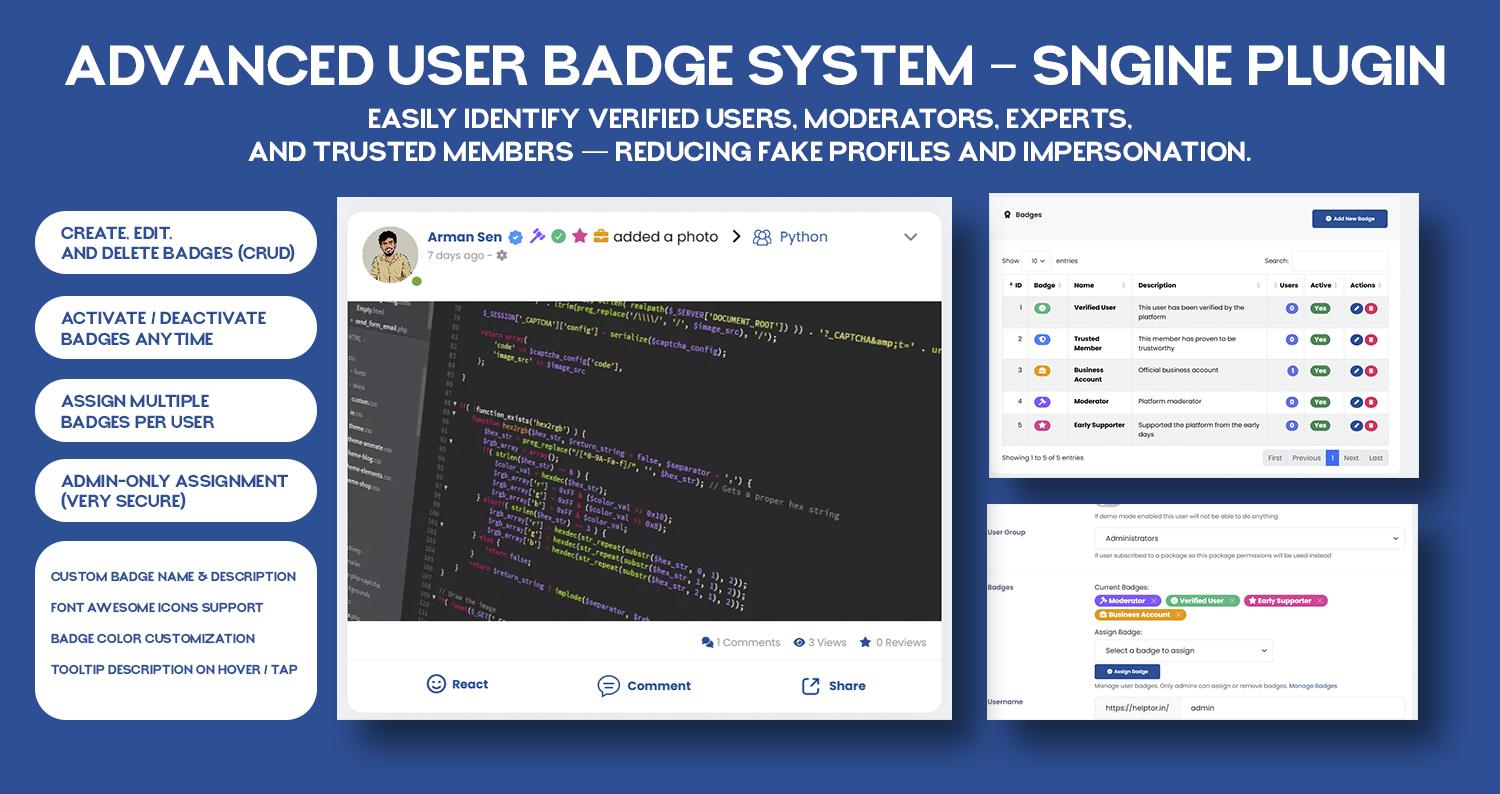
    Advanced User Badge System is a secure and flexible badge management plugin for Sngine – The Ultimate PHP Social Network Platform.
    It allows admins to create, manage, and assign custom badges to users, helping you build trust, credibility, and engagement across your community.

    Badges are displayed next to usernames on profiles, posts, and comments, making user roles, verification status, and achievements instantly visible.

    How It Helps
    ✔ Builds Trust & Transparency: Easily identify verified users, moderators, experts, and trusted members — reducing fake profiles and impersonation.

    ✔ Boosts User Engagement: Badges motivate users to stay active, contribute more, and feel recognized within the community.

    ✔ Improves Community Quality: Clear visual indicators help users understand who they’re interacting with, leading to better conversations.

    ✔ Fully Admin-Controlled: Only admins can create and assign badges — ensuring a secure and abuse-free system.

    Key Benefits
    Professional & trustworthy user identity system
    Reduces spam and fake verification
    Encourages long-term user participation
    Admin-only control for maximum security
    Lightweight, fast, and mobile-friendly
    Seamless integration with Sngine UI

    Features
    Badge Management
    Full badge CRUD (Create, Read, Update, Delete)
    Activate / deactivate badges anytime
    Assign multiple badges per user
    Admin-only badge assignment

    Customization
    Custom badge name & description
    Font Awesome icon support
    Badge color customization
    Tooltip descriptions on hover / tap

    Badge Display
    Badges appear next to usernames on:
    User profile pages
    Posts
    Comments
    Only active badges are displayed publicly.

    User Experience
    Clean & modern design
    Mobile-friendly and responsive
    Lightweight tooltips
    Smooth UI integration

    Developer Friendly
    Follows existing Sngine code style & conventions
    Easy installation
    No core file modification
    Ready to use after SQL setup & JS handlers

    Advanced User Badge System is a secure and flexible badge management plugin for Sngine – The Ultimate PHP Social Network Platform. It allows admins to create, manage, and assign custom badges to users, helping you build trust, credibility, and engagement across your community. Badges are displayed next to usernames on profiles, posts, and comments, making user roles, verification status, and achievements instantly visible. How It Helps ✔ Builds Trust & Transparency: Easily identify verified users, moderators, experts, and trusted members — reducing fake profiles and impersonation. ✔ Boosts User Engagement: Badges motivate users to stay active, contribute more, and feel recognized within the community. ✔ Improves Community Quality: Clear visual indicators help users understand who they’re interacting with, leading to better conversations. ✔ Fully Admin-Controlled: Only admins can create and assign badges — ensuring a secure and abuse-free system. Key Benefits Professional & trustworthy user identity system Reduces spam and fake verification Encourages long-term user participation Admin-only control for maximum security Lightweight, fast, and mobile-friendly Seamless integration with Sngine UI Features Badge Management Full badge CRUD (Create, Read, Update, Delete) Activate / deactivate badges anytime Assign multiple badges per user Admin-only badge assignment Customization Custom badge name & description Font Awesome icon support Badge color customization Tooltip descriptions on hover / tap Badge Display Badges appear next to usernames on: User profile pages Posts Comments Only active badges are displayed publicly. User Experience Clean & modern design Mobile-friendly and responsive Lightweight tooltips Smooth UI integration Developer Friendly Follows existing Sngine code style & conventions Easy installation No core file modification Ready to use after SQL setup & JS handlers

    5 Comentários 0 Compartilhamentos 1KB Visualizações
Helptor Expert Guidance https://helptor.in