


#helptor

2 posts0 followers
Trending Today
No data
Trending This Week
No data
  • Dear member, If you are registering as an Expert on Helptor, please ensure that you verify your expert account within 15 days of registration.
    If verification is not completed within this period, your profile will automatically be converted to a regular user account.
    #update#notice#policy#helptor
    Dear member, If you are registering as an Expert on <b>Helptor</b>, please ensure that you verify your expert account within <b>15 days of registration</b>. If verification is not completed within this period, your profile will automatically be converted to a regular user account. #update #notice #policy #helptor
    Love
    1
    0 Commentarios 0 Acciones 270 Views
  • Plugin System For Sngine Digital Nuevo
    Free
    In stock
    New Delhi
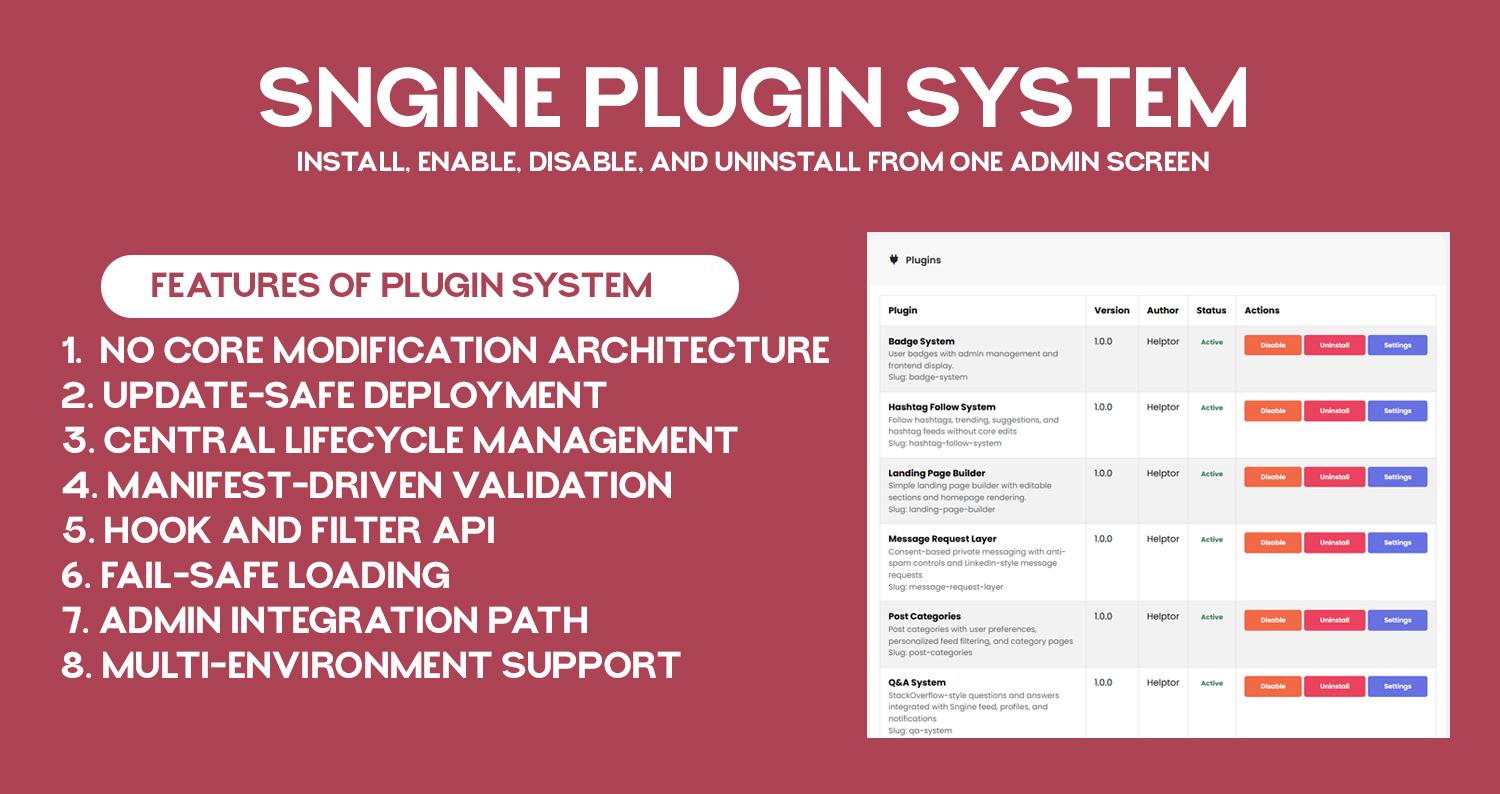
    No core modification architecture: plugin layer loads before Sngine and keeps custom logic outside core files.
    Update-safe deployment: core upgrades do not remove plugin folders or plugin registry state.
    Central lifecycle management: install, enable, disable, and uninstall from one admin screen.
    Manifest-driven validation: each plugin is discovered and verified through plugin.json metadata.
    Hook and filter API: plugins can subscribe to request, AJAX, and output-buffer events without template edits.
    Fail-safe loading: plugin runtime is designed to avoid full-site crash from one plugin failure.
    Admin integration path: plugin settings pages are accessible directly from /admincp/plugins.
    Multi-environment support: works on shared hosting and VPS with correct auto_prepend_file setup.
    Documentation: https://helptor.in/doc
    No core modification architecture: plugin layer loads before Sngine and keeps custom logic outside core files. Update-safe deployment: core upgrades do not remove plugin folders or plugin registry state. Central lifecycle management: install, enable, disable, and uninstall from one admin screen. Manifest-driven validation: each plugin is discovered and verified through plugin.json metadata. Hook and filter API: plugins can subscribe to request, AJAX, and output-buffer events without template edits. Fail-safe loading: plugin runtime is designed to avoid full-site crash from one plugin failure. Admin integration path: plugin settings pages are accessible directly from /admincp/plugins. Multi-environment support: works on shared hosting and VPS with correct auto_prepend_file setup. Documentation: https://helptor.in/doc
    Love
    1
    36 Commentarios 0 Acciones 355 Views
  • In this video, I show you how to install the Custom Badge Plugin on a Sngine website step by step.
    The installation process is very simple and does not require any coding knowledge.
    ✅ Installation Steps Covered:
    Download the Custom Badge Plugin
    Upload the plugin folder to your Sngine directory
    Import the provided SQL file into your database using phpMyAdmin
    Activate the plugin from the admin panel
    That’s it! Your Custom Badge Plugin will be ready to use.
    🔄 Update Policy
    Plugin updates will not overwrite your existing files
    If any update requires file replacement, it will be released as a new version
    🤝 Support Promise
    When you pay for my work, it is my responsibility to ensure the plugin works correctly for you.
    If you face any issues, feel free to reach out — I’m always happy to help.
    👍 Don’t forget to like, share, and subscribe for more Sngine tutorials and plugins.
    #Sngine
    #SnginePlugin
    #CustomBadge
    #SngineTutorial
    #PluginInstallation
    #PHP
    #WebDevelopment
    #SngineAddons
    #SngineCommunity
    #Helptor
    In this video, I show you how to install the Custom Badge Plugin on a Sngine website step by step. The installation process is very simple and does not require any coding knowledge. ✅ Installation Steps Covered: Download the Custom Badge Plugin Upload the plugin folder to your Sngine directory Import the provided SQL file into your database using phpMyAdmin Activate the plugin from the admin panel That’s it! Your Custom Badge Plugin will be ready to use. 🔄 Update Policy Plugin updates will not overwrite your existing files If any update requires file replacement, it will be released as a new version 🤝 Support Promise When you pay for my work, it is my responsibility to ensure the plugin works correctly for you. If you face any issues, feel free to reach out — I’m always happy to help. 👍 Don’t forget to like, share, and subscribe for more Sngine tutorials and plugins. #Sngine #SnginePlugin #CustomBadge #SngineTutorial #PluginInstallation #PHP #WebDevelopment #SngineAddons #SngineCommunity #Helptor
    Love
    3
    6 Commentarios 0 Acciones 429 Views
Helptor Expert Guidance https://helptor.in