#sngine

7 posts5 followers
Trending Today
No data
Trending This Week
No data
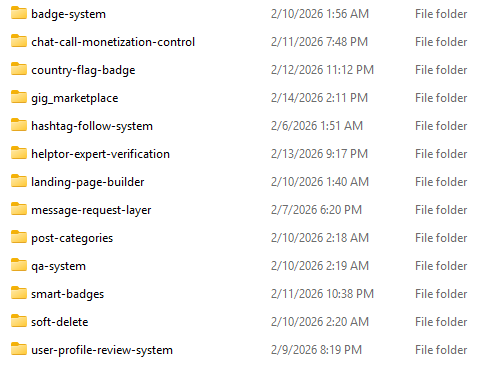
  • Tomorrow I will publish multi-language system for Landing page builder plugin.

    #update #sngine

    Tomorrow I will publish multi-language system for Landing page builder plugin.#update #sngine
    Like
    2
    0 Comentários 0 Compartilhamentos 430 Visualizações
  • Changelog2.3: Advanced User Badge System – Sngine Plugin (Admin-Controlled)

    Enhanced badge-system with user communications on badge events:

    1. Send in-app inbound system notification when badge is assigned/removed.
    2. Send email on badge assigned/removed.

    Added Badge System admin settings for templates:

    1. Notification templates:
    2. Assign Notification Message
    3. Remove Notification Message
    4. Email templates:
    5. Assign Email Subject/Body
    6. Remove Email Subject/Body
    7. Placeholder support added for:
    8. {{username}} , {{full_name}} , {{badge_name}} , {{badge_description}} , {{site_name}} , {{profile_url}} , {{admin_name}}

    Added live user search in “Assign To Users”:

    1. Introduced dedicated badge-admin live search endpoint.
    2. Autocomplete now shows avatar + display name + @username .
    3. Selecting a result auto-fills and submits.
    Changelog2.3: Advanced User Badge System – Sngine Plugin (Admin-Controlled)Enhanced badge-system with user communications on badge events:Send in-app inbound system notification when badge is assigned/removed.Send email on badge assigned/removed.Added Badge System admin settings for templates:Notification templates:Assign Notification MessageRemove Notification MessageEmail templates:Assign Email Subject/BodyRemove Email Subject/BodyPlaceholder support added for:{{username}} , {{full_name}} , {{badge_name}} , {{badge_description}} , {{site_name}} , {{profile_url}} , {{admin_name}}Added live user search in “Assign To Users”:Introduced dedicated badge-admin live search endpoint.Autocomplete now shows avatar + display name + @username .Selecting a result auto-fills and submits.
    Like
    2
    2 Comentários 0 Compartilhamentos 505 Visualizações
  • Launching Soon

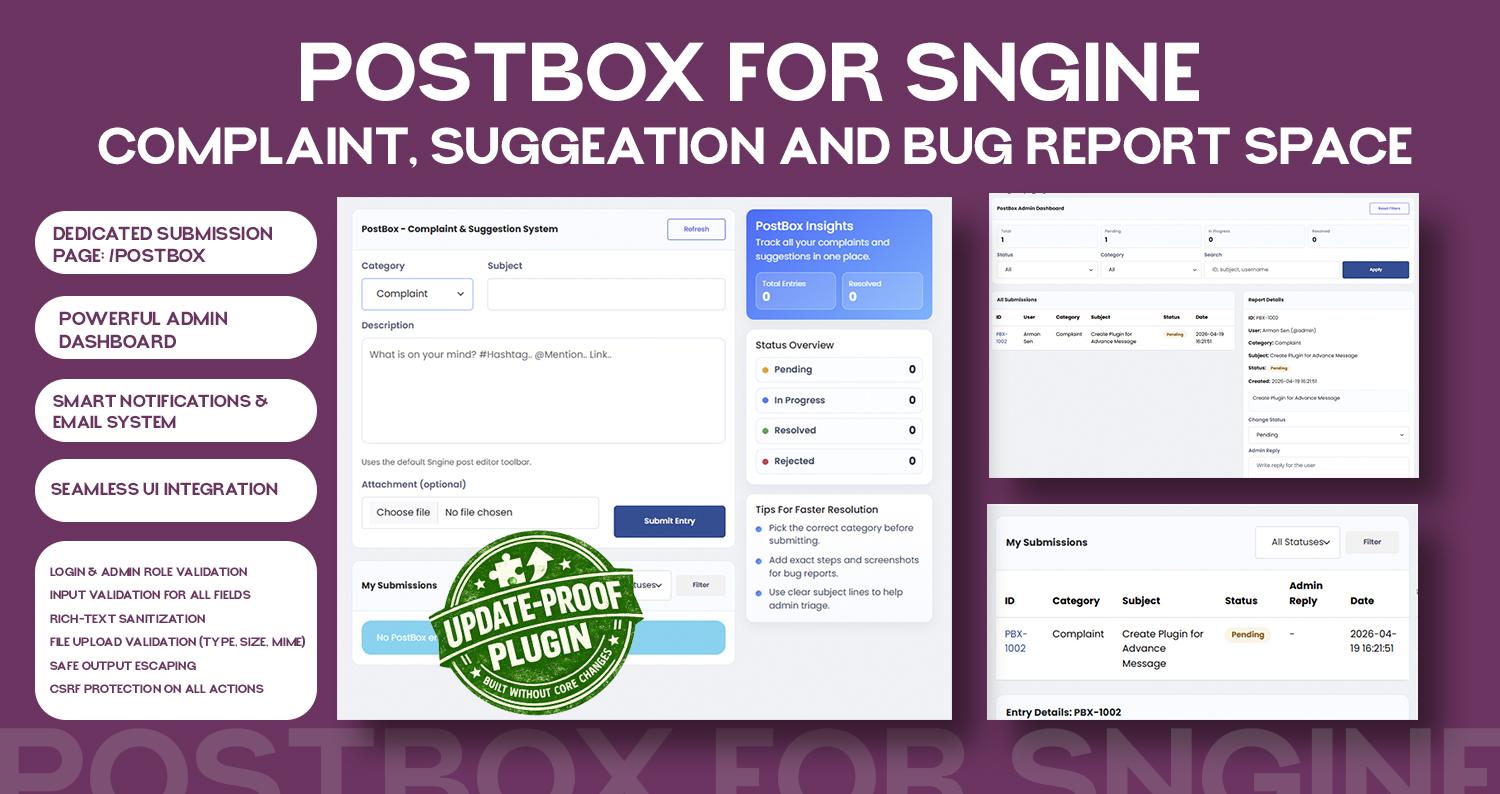
    PostBox: Space for manage all request for suggeation, complaints, bug report


    #update #Sngine

    Launching SoonPostBox: Space for manage all request for suggeation, complaints, bug report #update #Sngine
    Wow
    1
    0 Comentários 0 Compartilhamentos 540 Visualizações
  • Launching Soon:

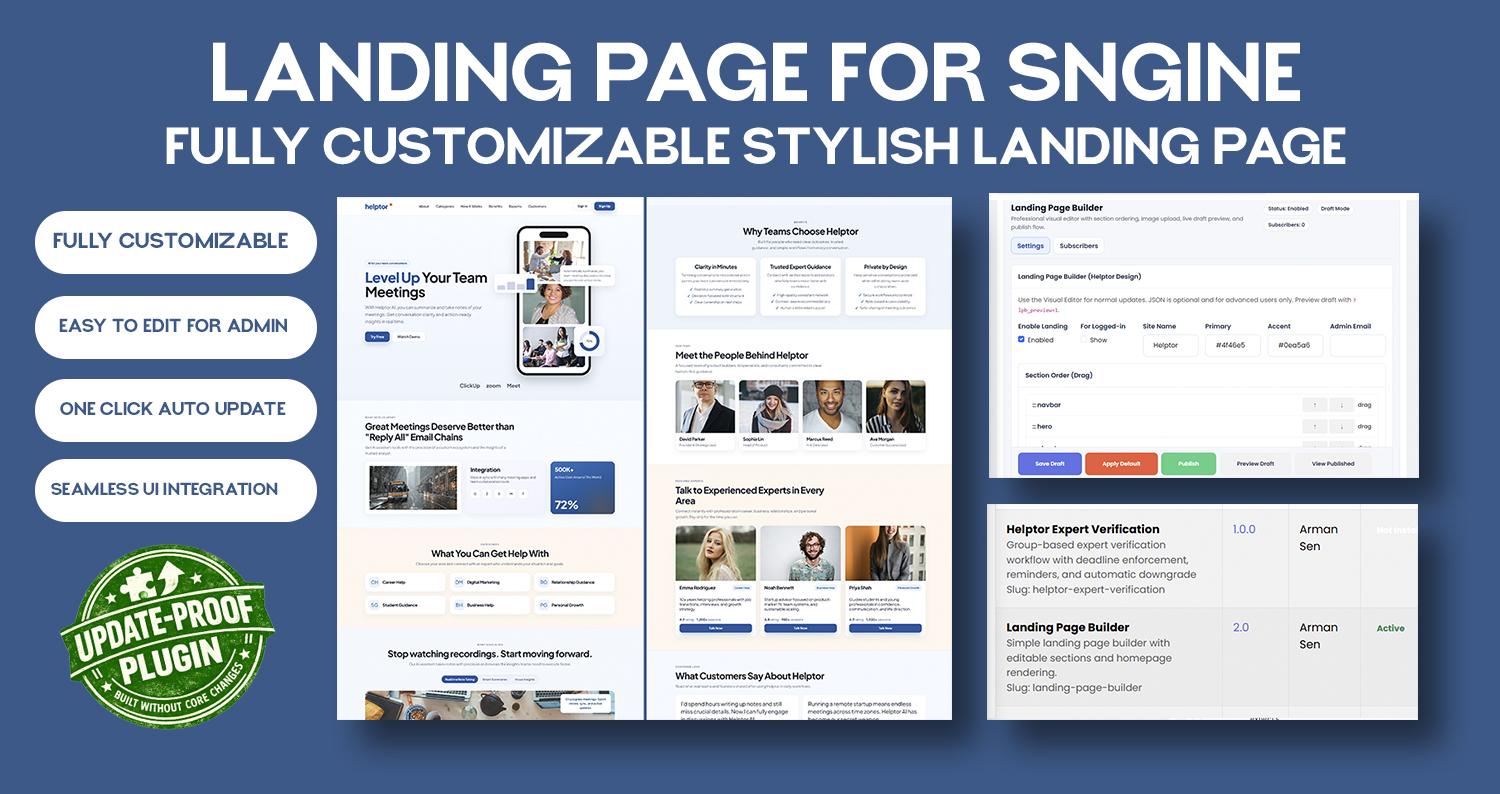
    Landing Page Builder

    #update #Sngine

    Launching Soon:Landing Page Builder#update #Sngine
    Like
    Love
    2
    10 Comentários 0 Compartilhamentos 531 Visualizações
  • Working on to upgrade message features. I will release upgrade soon.

    If you have any suggeation, share me on Postbox: https://helptor.in/postbox

    #sngine #update
    Working on to upgrade message features. I will release upgrade soon. If you have any suggeation, share me on Postbox: https://helptor.in/postbox #sngine #update
    Like
    Love
    2
    3 Comentários 0 Compartilhamentos 730 Visualizações
  • I would like to inform you that all plugin updates compatible with Sngine 4.3 will be published within the next few days.Please find below some of the key updates:

    1. Updated Plugin Manager URL:The plugin manager link has been changed from /admincp/plugins to /admincp/heptor.
    2. Auto Update :An auto-update feature will be available, making it easier and more convenient for you to update plugins.
    I would like to inform you that all plugin updates compatible with Sngine 4.3 will be published within the next few days.Please find below some of the key updates:Updated Plugin Manager URL:The plugin manager link has been changed from /admincp/plugins to /admincp/heptor.Auto Update :An auto-update feature will be available, making it easier and more convenient for you to update plugins.
    Love
    Like
    4
    0 Comentários 0 Compartilhamentos 652 Visualizações
  • How to Install Sngine Plugin System | Step-by-Step Tutorial

    If you want to extend Sngine features without editing core files, the plugin system is the best and safest way.

    #sngine #development #update #tutorial
    How to Install Sngine Plugin System | Step-by-Step Tutorial If you want to extend Sngine features without editing core files, the plugin system is the best and safest way. #sngine #development #update #tutorial
    Like
    1
    5 Comentários 0 Compartilhamentos 1KB Visualizações
  • I am glad to inform you that, some plugins are ready to launch.
    Stay tuned.

    #update #sngine #plugin
    I am glad to inform you that, some plugins are ready to launch. Stay tuned. #update #sngine #plugin
    Like
    Wow
    4
    0 Comentários 0 Compartilhamentos 880 Visualizações
  • Dear Member, I am creating #installation video for all sngine plugin #system. It will help you to install without any doubts.

    Please allow some time.
    Dear Member, I am creating #installation video for all sngine plugin #system. It will help you to install without any doubts. Please allow some time.
    Like
    Love
    2
    2 Comentários 0 Compartilhamentos 899 Visualizações
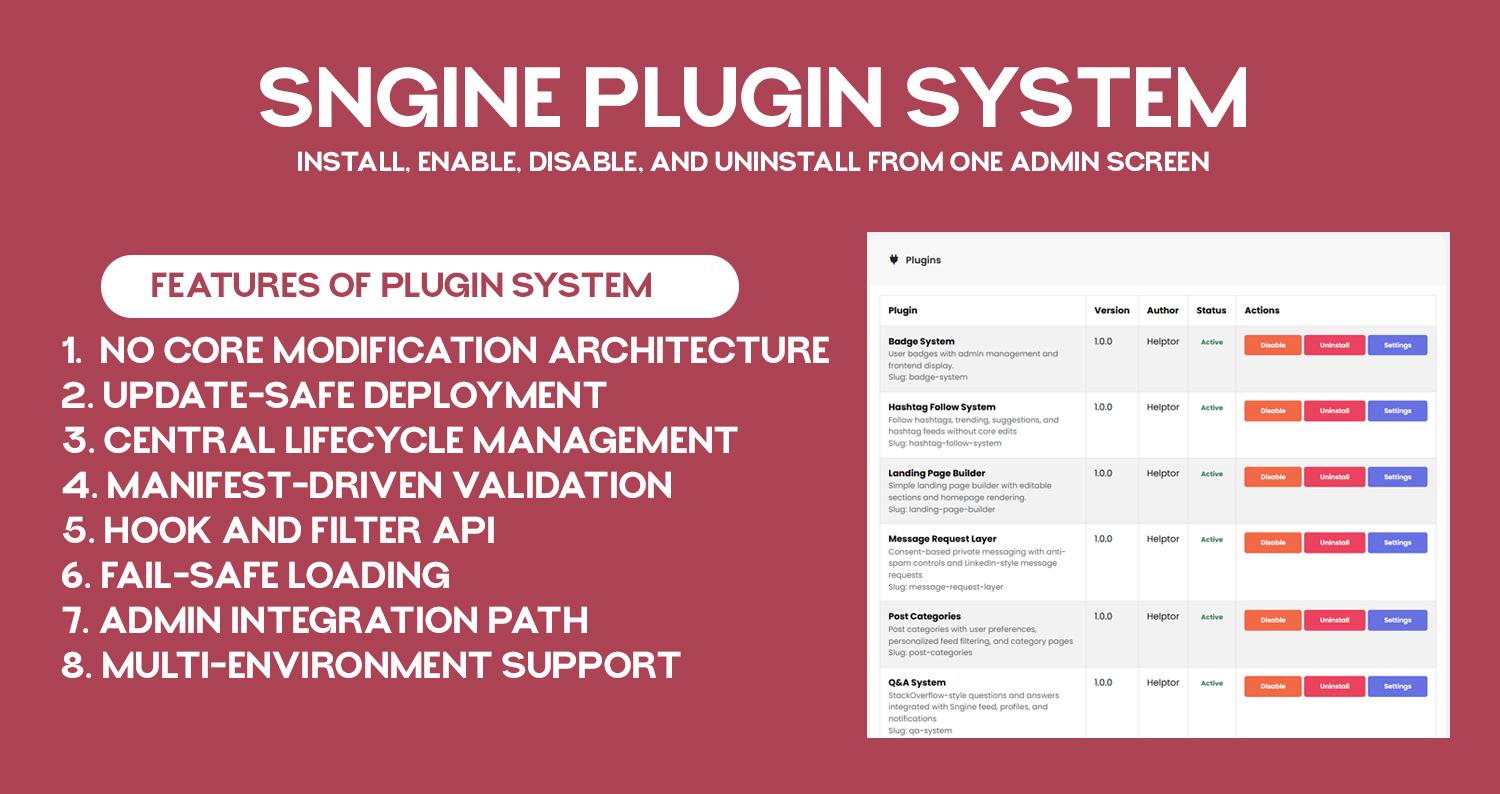
  • Plugin System For Sngine 2.0 Digital Novo
    Gratuito
    Em estoque
    New Delhi
    No core modification architecture: plugin layer loads before Sngine and keeps custom logic outside core files.

    Update-safe deployment: core upgrades do not remove plugin folders or plugin registry state.

    Central lifecycle management: install, enable, disable, and uninstall from one admin screen.

    Manifest-driven validation: each plugin is discovered and verified through plugin.json metadata.

    Hook and filter API: plugins can subscribe to request, AJAX, and output-buffer events without template edits.

    Fail-safe loading: plugin runtime is designed to avoid full-site crash from one plugin failure.

    Admin integration path: plugin settings pages are accessible directly from /admincp/helptor.

    Multi-environment support: works on shared hosting and VPS with correct auto_prepend_file setup.

    Documentation: https://helptor.in/doc
    No core modification architecture: plugin layer loads before Sngine and keeps custom logic outside core files. Update-safe deployment: core upgrades do not remove plugin folders or plugin registry state. Central lifecycle management: install, enable, disable, and uninstall from one admin screen. Manifest-driven validation: each plugin is discovered and verified through plugin.json metadata. Hook and filter API: plugins can subscribe to request, AJAX, and output-buffer events without template edits. Fail-safe loading: plugin runtime is designed to avoid full-site crash from one plugin failure. Admin integration path: plugin settings pages are accessible directly from /admincp/helptor. Multi-environment support: works on shared hosting and VPS with correct auto_prepend_file setup. Documentation: https://helptor.in/doc
    Like
    Love
    2
    45 Comentários 0 Compartilhamentos 1KB Visualizações
  • We are currently developing a Global Plugin System for #Sngine, designed to manage all plugins from a single, centralized location with easy installation and uninstallation.

    As part of this initiative, the following plugins are our top priorities:

    1. Reputation / Points System
    2. Hashtag Follow System
    3. Paid Chat & Call (per-minute based)
    4. HTML support in posts
    5. One-click database and file upload backup
    6. SEO optimization for posts

    Note: If the #Zamblek team releases any of these features natively, we will exclude that item from our #development #roadmap.
    Additionally, if you have any suggestions or feature requests, we would be happy to hear them.
    We are currently developing a Global Plugin System for #Sngine, designed to manage all plugins from a single, centralized location with easy installation and uninstallation. As part of this initiative, the following plugins are our top priorities: 1. Reputation / Points System 2. Hashtag Follow System 3. Paid Chat & Call (per-minute based) 4. HTML support in posts 5. One-click database and file upload backup 6. SEO optimization for posts Note: If the #Zamblek team releases any of these features natively, we will exclude that item from our #development #roadmap. Additionally, if you have any suggestions or feature requests, we would be happy to hear them.
    Like
    Wow
    3
    3 Comentários 0 Compartilhamentos 1KB Visualizações
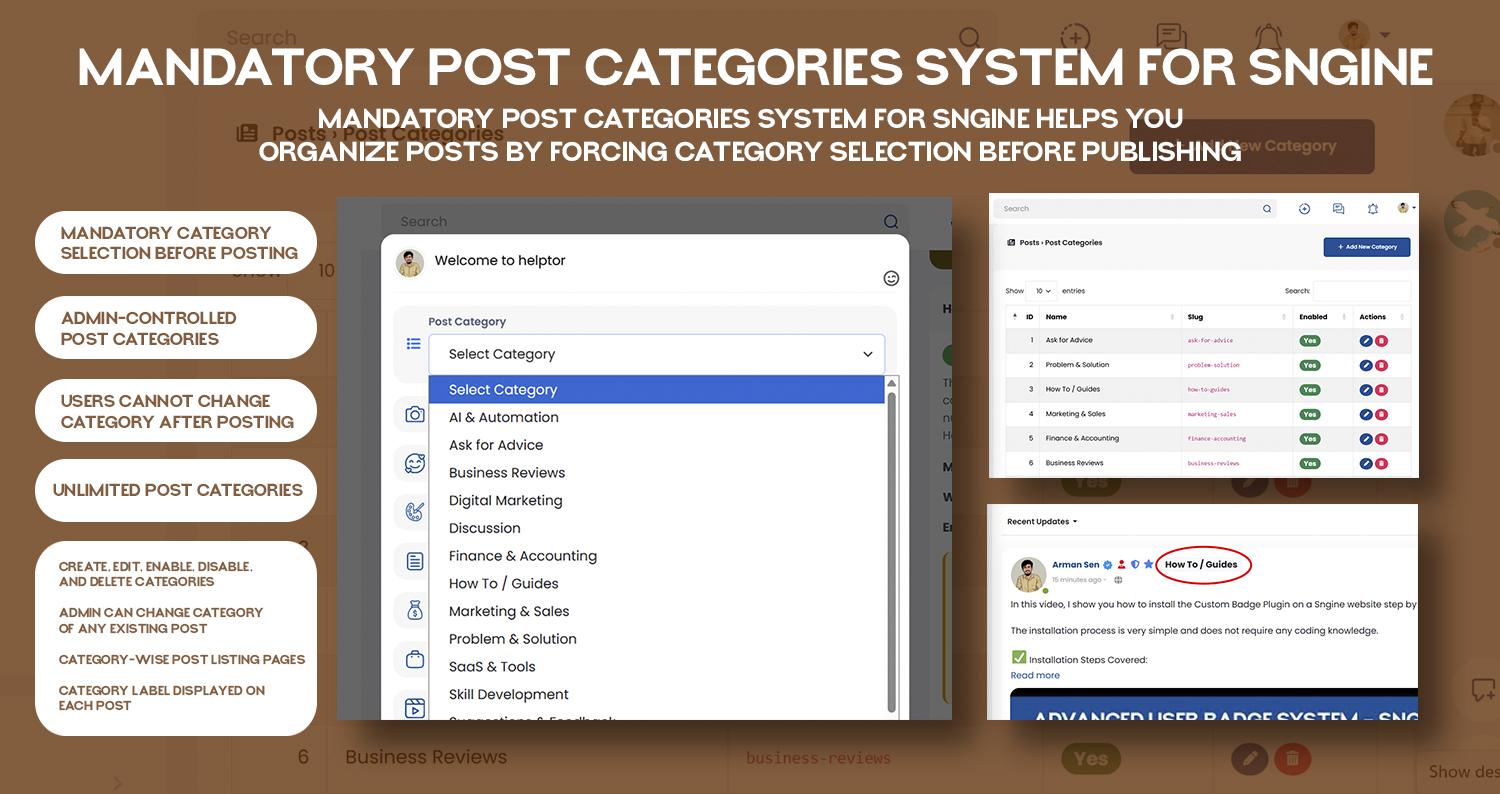
  • Mandatory Post Categories System Plugin for Sngine Digital Novo
    ₹1,900.00
    Em estoque
    New Delhi, Delhi, India
    Mandatory Post Categories System for Sngine is a powerful plugin that brings blog-style category organization to your Sngine-based website.

    With this plugin, users must select a category before publishing a post, ensuring that all content is properly structured from the start. Categories are fully controlled by the admin, giving you complete authority over how posts are organized, moderated, and displayed.

    This plugin is ideal for communities, help platforms, forums, Q&A websites, and discussion networks that need clean content structure and better discoverability.

    Why You Need This Plugin

    Default Sngine posts are unstructured, which can lead to:

    Mixed and confusing content
    Difficult moderation
    Poor content discovery
    Low-quality discussions
    This plugin solves these problems by enforcing mandatory categorization, just like a professional blog or forum system.

    🔑 Key Features
    ✔ Mandatory Category Selection

    Users cannot publish a post without selecting a category.
    This ensures that every post belongs to a clear topic area.

    If a category is not selected, the system displays a validation message and prevents posting.

    ✔ Admin-Controlled Categories

    Only admins can manage post categories.

    From the admin panel, you can:

    Create new categories
    Edit category names
    Enable or disable categories
    Delete categories when no longer needed
    Users cannot create, edit, or delete categories, keeping your platform structured and controlled.

    ✔ Unlimited Categories

    There is no limit to the number of categories you can create.
    You can organize posts based on your niche, such as:

    Career
    Business
    Education
    Health
    Technology
    Personal
    ✔ One Category Per Post (Clean Structure)

    Each post can belong to only one category, ensuring:

    Focused discussions
    Clean feeds
    Easy moderation
    ✔ User Restriction After Posting

    Once a post is published:

    ❌ Users cannot change the post category
    This prevents misuse and keeps content consistent.

    ✔ Admin Override for Existing Posts

    Admins have full moderation control and can:

    Change the category of any existing post
    This is useful when:

    Users select the wrong category
    Content needs re-organization
    Moderation adjustments are required
    ✔ Category-Wise Post Pages

    Each category has its own dedicated page where all related posts are displayed together.

    Example:

    /category/career
    /category/business
    This helps users quickly find content related to a specific topic.

    ✔ Category Label on Posts

    Every post clearly displays its category label, making it easy to understand the post topic at a glance.

    🎯 Perfect For

    Community websites
    Q&A platforms
    Help & support networks
    Educational forums
    Business discussion platforms
    Niche social networks built on Sngine

    Mandatory Post Categories System for Sngine is a powerful plugin that brings blog-style category organization to your Sngine-based website. With this plugin, users must select a category before publishing a post, ensuring that all content is properly structured from the start. Categories are fully controlled by the admin, giving you complete authority over how posts are organized, moderated, and displayed. This plugin is ideal for communities, help platforms, forums, Q&A websites, and discussion networks that need clean content structure and better discoverability. Why You Need This Plugin Default Sngine posts are unstructured, which can lead to: Mixed and confusing content Difficult moderation Poor content discovery Low-quality discussions This plugin solves these problems by enforcing mandatory categorization, just like a professional blog or forum system. 🔑 Key Features ✔ Mandatory Category Selection Users cannot publish a post without selecting a category. This ensures that every post belongs to a clear topic area. If a category is not selected, the system displays a validation message and prevents posting. ✔ Admin-Controlled Categories Only admins can manage post categories. From the admin panel, you can: Create new categories Edit category names Enable or disable categories Delete categories when no longer needed Users cannot create, edit, or delete categories, keeping your platform structured and controlled. ✔ Unlimited Categories There is no limit to the number of categories you can create. You can organize posts based on your niche, such as: Career Business Education Health Technology Personal ✔ One Category Per Post (Clean Structure) Each post can belong to only one category, ensuring: Focused discussions Clean feeds Easy moderation ✔ User Restriction After Posting Once a post is published: ❌ Users cannot change the post category This prevents misuse and keeps content consistent. ✔ Admin Override for Existing Posts Admins have full moderation control and can: Change the category of any existing post This is useful when: Users select the wrong category Content needs re-organization Moderation adjustments are required ✔ Category-Wise Post Pages Each category has its own dedicated page where all related posts are displayed together. Example: /category/career /category/business This helps users quickly find content related to a specific topic. ✔ Category Label on Posts Every post clearly displays its category label, making it easy to understand the post topic at a glance. 🎯 Perfect For Community websites Q&A platforms Help & support networks Educational forums Business discussion platforms Niche social networks built on Sngine

    Like
    2
    7 Comentários 0 Compartilhamentos 1KB Visualizações
Páginas impulsionada
Helptor Expert Guidance https://helptor.in