Advanced User Badge System is a secure and flexible badge management plugin for Sngine – The Ultimate PHP Social Network Platform.
It allows admins to create, manage, and assign custom badges to users, helping you build trust, credibility, and engagement across your community.
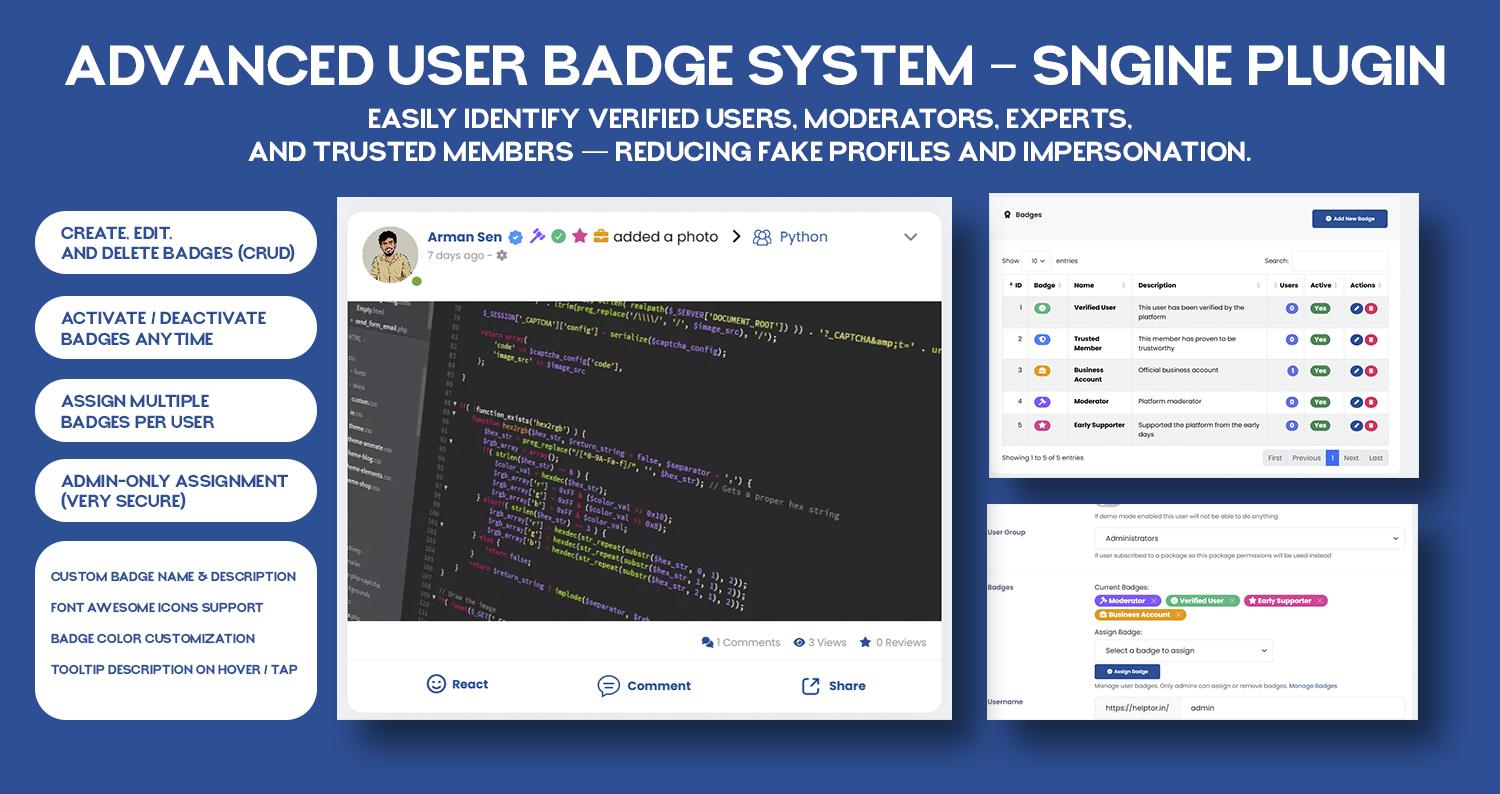
Badges are displayed next to usernames on profiles, posts, and comments, making user roles, verification status, and achievements instantly visible.
How It Helps
✔ Builds Trust & Transparency: Easily identify verified users, moderators, experts, and trusted members — reducing fake profiles and impersonation.
✔ Boosts User Engagement: Badges motivate users to stay active, contribute more, and feel recognized within the community.
✔ Improves Community Quality: Clear visual indicators help users understand who they’re interacting with, leading to better conversations.
✔ Fully Admin-Controlled: Only admins can create and assign badges — ensuring a secure and abuse-free system.
Key Benefits
Professional & trustworthy user identity system
Reduces spam and fake verification
Encourages long-term user participation
Admin-only control for maximum security
Lightweight, fast, and mobile-friendly
Seamless integration with Sngine UI
Features
Badge Management
Full badge CRUD (Create, Read, Update, Delete)
Activate / deactivate badges anytime
Assign multiple badges per user
Admin-only badge assignment
Customization
Custom badge name & description
Font Awesome icon support
Badge color customization
Tooltip descriptions on hover / tap
Badge Display
Badges appear next to usernames on:
User profile pages
Posts
Comments
Only active badges are displayed publicly.
User Experience
Clean & modern design
Mobile-friendly and responsive
Lightweight tooltips
Smooth UI integration
Developer Friendly
Follows existing Sngine code style & conventions
Easy installation
No core file modification
Ready to use after SQL setup & JS handlers
Advanced User Badge System is a secure and flexible badge management plugin for Sngine – The Ultimate PHP Social Network Platform.
It allows admins to create, manage, and assign custom badges to users, helping you build trust, credibility, and engagement across your community.
Badges are displayed next to usernames on profiles, posts, and comments, making user roles, verification status, and achievements instantly visible.
How It Helps
✔ Builds Trust & Transparency: Easily identify verified users, moderators, experts, and trusted members — reducing fake profiles and impersonation.
✔ Boosts User Engagement: Badges motivate users to stay active, contribute more, and feel recognized within the community.
✔ Improves Community Quality: Clear visual indicators help users understand who they’re interacting with, leading to better conversations.
✔ Fully Admin-Controlled: Only admins can create and assign badges — ensuring a secure and abuse-free system.
Key Benefits
Professional & trustworthy user identity system
Reduces spam and fake verification
Encourages long-term user participation
Admin-only control for maximum security
Lightweight, fast, and mobile-friendly
Seamless integration with Sngine UI
Features
Badge Management
Full badge CRUD (Create, Read, Update, Delete)
Activate / deactivate badges anytime
Assign multiple badges per user
Admin-only badge assignment
Customization
Custom badge name & description
Font Awesome icon support
Badge color customization
Tooltip descriptions on hover / tap
Badge Display
Badges appear next to usernames on:
User profile pages
Posts
Comments
Only active badges are displayed publicly.
User Experience
Clean & modern design
Mobile-friendly and responsive
Lightweight tooltips
Smooth UI integration
Developer Friendly
Follows existing Sngine code style & conventions
Easy installation
No core file modification
Ready to use after SQL setup & JS handlers










 English
 Arabic
 French
 Spanish
 Portuguese
 Deutsch
 Dutch
Dutch
 Italiano
 Russian
 Romaian
 Portuguese (Brazil)
 Greek
Greek