


Featured Services





Group for python developer
-
Public Group
-
4 Entradas
-
4 Fotos
-
0 Videos
-
Educación
Buscar
© 2026 Helptor Expert Guidance
 Spanish
Spanish
 English
 Arabic
 French
 Portuguese
 Deutsch
 Turkish
 Dutch
Dutch
 Italiano
 Russian
 Romaian
 Portuguese (Brazil)
 Greek
Greek
Actualizaciones Recientes
-
#Problem: Python was not found; run without arguments to install from the Microsoft Store, or disable this shortcut from Settings > Apps > Advanced app settings > App execution aliases.
#Solution:
1. Check your Python version and be sure it is installed on your machine
2. Check the path environment variable
3. Go to -> "start" and type "Manage App Execution Aliases". Go to it and turn off "Python"
#python #development #error#Problem: Python was not found; run without arguments to install from the Microsoft Store, or disable this shortcut from Settings > Apps > Advanced app settings > App execution aliases. #Solution: 1. Check your Python version and be sure it is installed on your machine 2. Check the path environment variable 3. Go to -> "start" and type "Manage App Execution Aliases". Go to it and turn off "Python" #python #development #error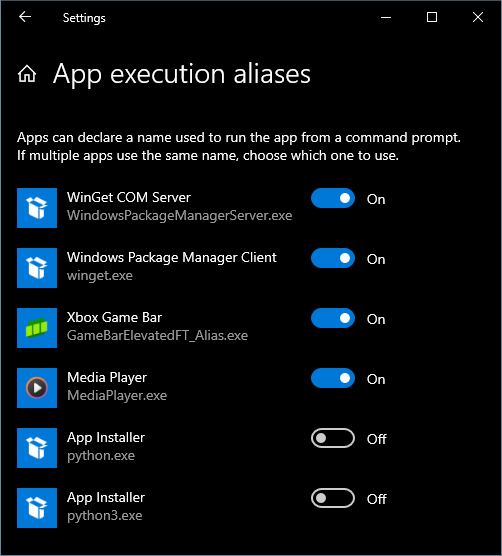 0 Commentarios 0 Acciones 524 Views

Quizás te interese…

Helptor Expert Guidance
https://helptor.in